How to build a practice routine for any song
Pick a song you are learning. Mark the section you keep getting wrong, loop it, and set the speed you can actually play it at. DrumLock saves that as a routine, so tomorrow you press one button and the practice is already set up for you.
Here is the whole thing, step by step, with screenshots taken from the current version of the app. It takes about two minutes the first time and under a minute after that.
Before you start
- An Android phone with DrumLock installed.
- The song saved on your phone as an audio file. MP3, M4A and WAV all work. A streaming subscription will not, because the app plays a file that lives on your device.
- Song segments are part of Pro, a one time $4.99 unlock. The free version gives you one custom routine plus the full metronome, the speed trainer, all 40 rudiments and your session history.
Step 1. Create the routine
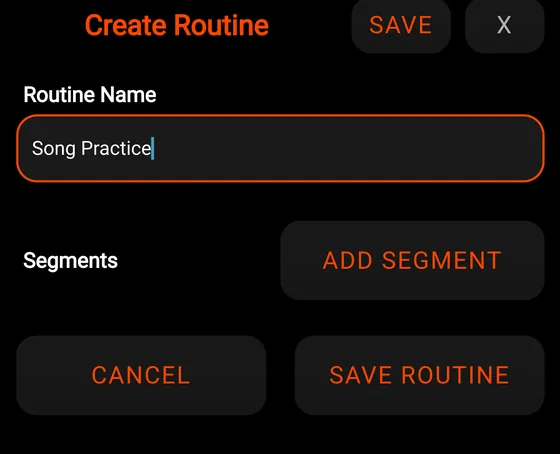
Open the routine selector, the wide button that says OPEN PRACTICE until you pick something else, and tap Create New Routine. Give it a name.
Name it after the song rather than after the word practice. In three weeks you will have several of these and you want to know which is which at a glance.
Step 2. Add your first section
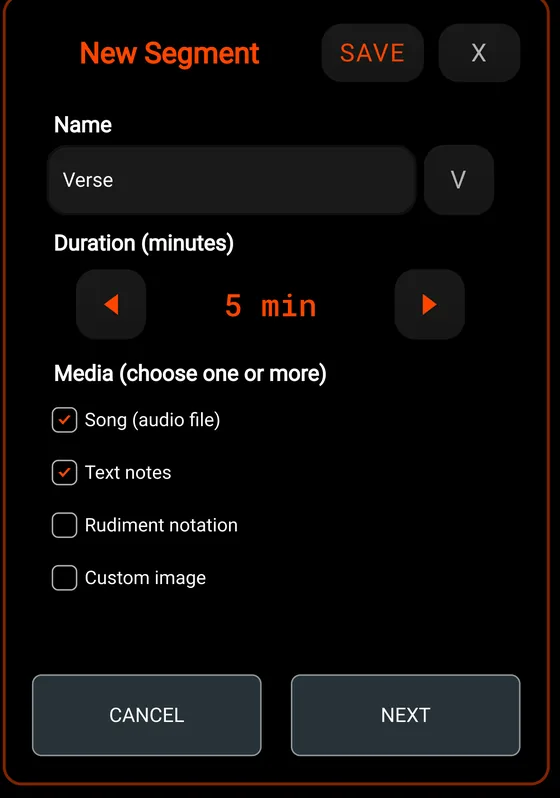
Tap ADD SEGMENT. Name this one after the part of the song you are working on: Intro, Verse, Chorus, or that fill at 2:10 that keeps falling apart. Set how many minutes you want to spend on it.
Under Media, tick Song (audio file). Tick Text notes as well if you want to leave yourself an instruction that shows on screen while you play.
Step 3. Point it at the song and mark the loop
Tap NEXT, then Choose Audio File and pick the track off your phone. Now set Start Time and End Time in seconds. That pair is your loop. The app plays only that slice, over and over.
If you do not know the timestamps, play the song in any music player, watch the counter, and note where the section starts and ends. Round to the nearest second. Being a beat early is better than being late, because it gives you a run up into the part.
Leaving End Time at 0 plays from your start point to the end of the file.
Step 4. Set the speed for that section
This is the part that changed in the latest version, and it is the one worth knowing about. Underneath the start and end times there is a Playback Speed slider that runs from 50% to 100%.
Whatever you set here is saved with the segment. Every time your routine reaches this section, the audio starts at that speed on its own. You are not reaching for a slider with sticks in your hands.
Slowing the song down does not drop the pitch. It still sounds like the song, just slower.
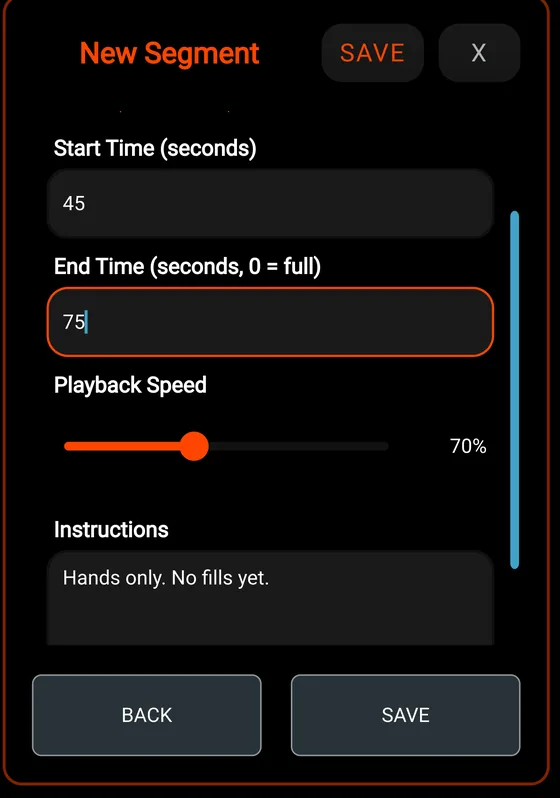
Pick the speed you can play cleanly, not the speed you can survive. If you are hanging on, you are practising hanging on. Drop it another 10% and the part starts to sound like music instead of damage control.
Step 5. Add the rest of the sections
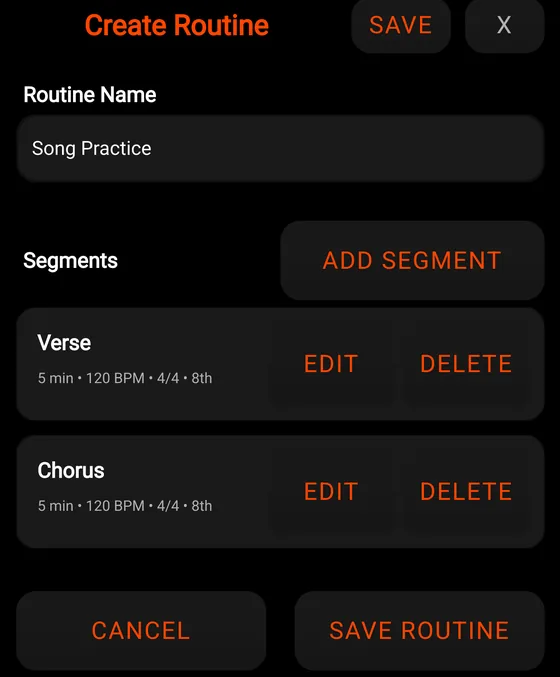
Repeat for each part you are working on. Every segment points at its own audio file, so one routine can cover two different songs if that is what your week looks like.
Two or three sections is plenty. A routine with nine segments is a to do list you will quietly stop opening.
Step 6. Run it
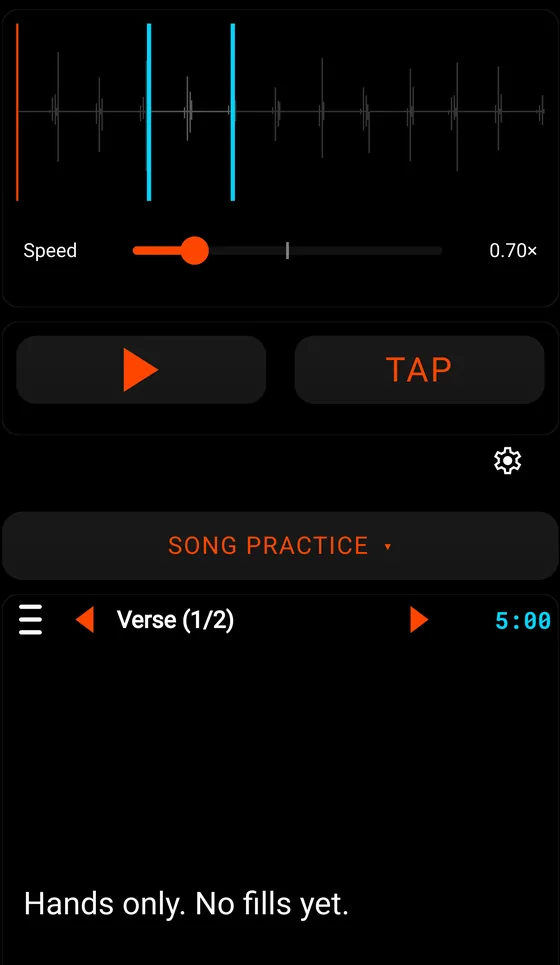
Pick your routine from the selector. The main screen swaps into song mode: the waveform along the top with your loop marked out, a speed readout, the countdown for the current segment, and your note underneath.
Look at the speed. It already reads 0.70x, because that is what you saved for this section. Press play and go. When the timer runs out, the arrows move you to the next section, which loads at its own speed.
The slider on this screen is a live override. Drag it mid song if you want to push a little faster, and it will not overwrite the speed you saved.
Moving the speed up
The routine is only worth building if the numbers move. A method that works:
- Start at a speed where the part is boring. That is the right starting speed.
- Play it clean three times in a row, then raise that segment by 5%.
- If you miss it twice, drop back 5% and stay there for a few days.
- Getting to 100% in week one is not the win. Playing it right at 70% is what makes 100% possible later.
If you teach
Teachers use this to hand a student their week in one screen: the exact section, the exact speed, and the instruction sitting there where they cannot forget it. The student opens one routine instead of trying to remember what you said on Tuesday.
If you teach drums and want the full version to try with your students, email [email protected] and I will send you a code. No catch, I want to know whether it holds up with real students.
Questions
Does slowing the song down change the pitch?
No. The song plays slower and stays in the same key.
How slow can it go?
50% of the original speed.
Do I need Pro for this?
Yes for song segments. The free version includes one custom routine, the full metronome, the speed trainer, all 40 rudiments and your session history. Playing an audio file inside a routine is part of the $4.99 unlock, paid once.
What audio files work?
Files stored on your phone, including MP3, M4A and WAV. Music from a streaming subscription cannot be used, because the app needs a file it can read from your device.
Can I change the speed while I am practising?
Yes. The slider on the practice screen overrides the speed for right now and leaves the saved value alone, so the next time you run the routine it starts where you set it.
Can one routine use more than one song?
Yes. Each segment points at its own audio file.
What if I do not know where the section starts?
Play the track in any music player and watch the time counter. Note the second the section begins and the second it ends, then round. You can edit the segment later once you have heard the loop a few times.